
See what changes for users after your releases.
Start with a UX Health Audit of one important workflow. Continue with release comparisons when the required data is available.
v2.14.3·Checkout Flow Redesign
Checkout completion rate dropped 8.2% for returning users. New “express checkout” button is being missed on step 3. New users appear unaffected — they have no prior muscle memory.
- HighStep 3 abandonment rate+340%
- MedTime on step 3+2.4s
- PosNew user completion rate+12%
Most teams don't realize when they break the UX.
Not because they're careless, but because the signals are subtle. After a release:
- Users hesitate where they didn't before.
- Flows take longer to complete.
- Power users stumble in familiar places.
- Support questions rise without a clear cause.
By the time the issue is obvious, the damage is already done.
Every UI change affects user behavior, even small ones.
Those changes show up as:
The evidence already exists in your session data. What's missing is an automated way to compare before vs after and clearly answer:
“Did this release change how users behave, and does it matter?”
You shipped. How did users react?
For each release, it:
- 01Compares real user behavior before and after changes.
- 02Detects meaningful behavior shifts and UX issues.
- 03Highlights where friction increased or decreased.
- 04Explains the likely impact in plain language.
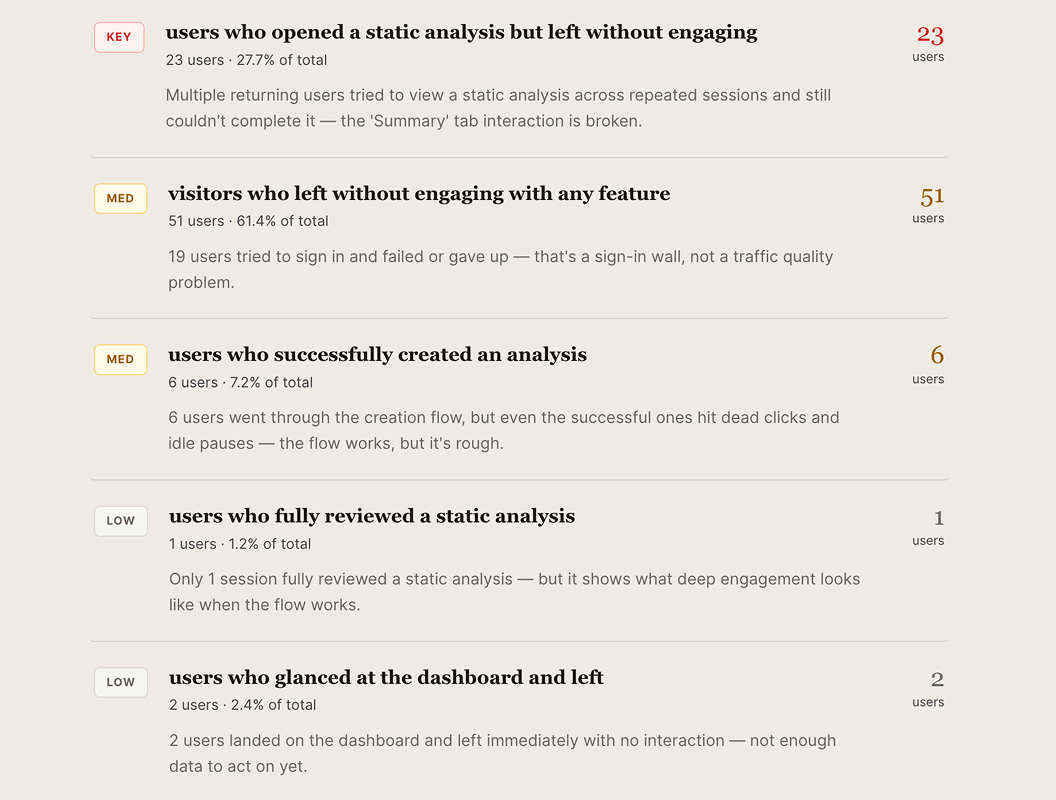
As soon as there have been enough sessions (~30) you get a concise, actionable Release Impact Report. And your very first report is a UX Health Audit: what's already broken and creating friction for users, before you ship anything.
No guesswork. No replay rabbit holes. No waiting weeks to be sure.
A concise, actionable report for every release.
Each Release Impact Report answers:
- →What changed in user behavior.
- →Which user groups were affected.
- →Where friction increased or decreased.
- →Whether the change was likely intentional.
- →How confident the system is, and why.
- →What to fix first — one action each for engineering, product, and design.
When UXSense detects a significant UX issue, you can dig in — without fishing.
- Review example sessions automatically surfaced.
- Compare new users vs. experienced users.
- Inspect edge cases without replay hunting.
No fishing expeditions. Only investigation when there's signal.
This isn't another dashboard. It's your behavioral check, every time you ship.
Before UXSense
- UX issues surface days or weeks later. By the time you notice, thousands of users have already been affected.
- Investigation is manual and anecdotal. Someone has to dig through analytics, screenshots, and Slack threads.
- Teams debate whether a problem is “real.” Without clear data, conversations stall and fixes get deprioritized.
- Insights live in dashboards no one checks. The data might exist, but no one's watching it after every release.
With UXSense
- Behavior changes surface within 24 hours. You see what shifted, not weeks later.
- Every change is tied to a specific release. No more guessing which deploy caused the drop.
- Statistical evidence replaces gut feel. Before/after comparisons, with every figure computed from your sessions, never generated by an AI.
- The verdict comes to you. A short digest lands in Slack after every release, the full report is there when you want to dig in.
Setup takes minutes, not weeks.
Compares thousands of sessions to detect meaningful behavior changes between release windows.
Works alongside your existing product analytics stack.
Add one line to your site.
The lightweight UXSense snippet records sessions directly, no session replay vendor required. Already recording? No problem, connect your existing replay tool and the load map starts building.
Compares behavior before and after each release.
AI analyzes thousands of sessions to detect meaningful user behavior changes between release windows.
Delivers a Release Impact Report automatically.
A concise, actionable summary explaining what changed, who was affected, and whether it matters.
Drift checks pull requests before merge. Releases tells you what actually happened.
Every Drift prediction is stored against the release that ships it, Releases is where the grade comes from. Turn it on and the loop closes: signals that don't predict real behavior change get demoted, automatically.
Both products, one price.
Combine Drift Team + Releases Growth for one flat fee, includes up to 6, 20, or 50 checked seats. At 20 seats ($449/mo) Release reports are practically free.
Annual: 10× monthly — 2 months free
Easy to try, easy to grow with.
Every release you ship gets a Release Impact Report, generated automatically.
First Report
See what UXSense finds in your own product.
- 1 Release Impact Report — lifetime
- No card required
- Full report, not a sample
Starter
For a single product team shipping regularly.
- 5 Release Impact Reports / month
- 1 project
- Core user behavior change detection
- Slack alerts
Team
Built for cross-functional product and design teams.
- 7 Release Impact Reports / project / month
- Up to 3 projects
- Priority alerts
- Basic integrations
Growth
For teams scaling UX quality across products and orgs.
- Unmetered Release Impact Reports
- Unlimited projects
- Each report analyzes all relevant user behavior, regardless of session volume
- Advanced segmentation
- Dedicated support
Enterprise
For organizations with formal procurement needs.
- SSO and security reviews
- SLAs
- Account management
FAQ
What does my first report contain, and how is it different from a release comparison?
Your first report is a UX Health Audit: an observational review of one important workflow using existing sessions, identifying friction before you ship anything new. A Release Impact Report is a before/after comparison tied to a specific deploy; it requires sessions recorded both before and after that release. The audit comes first — it doesn't require a paired release.
Can I use my existing recordings? Which sources and permissions are required?
Yes, if your recording source is supported and you hold the appropriate data permissions. We can work with recordings from common session recording tools. Required scopes and permissions depend on your setup — we review these with you during onboarding so nothing is connected without your explicit authorization.
Can I review a past release, or do I need to wait for the next one?
If you have relevant sessions recorded around a past deploy, we can assess what evidence is available and whether a retrospective comparison is viable. This depends on session coverage, the workflow in question, and the timing of your recordings. We'll be explicit about what the data supports before committing to a result.
What happens when there is not enough relevant data?
We tell you. If sessions are insufficient for a meaningful comparison, the report will say so — it will not fill the gap with a model-generated estimate. An unassessable outcome stays unassessable; we'd rather give you an honest “not enough data yet” than a confident answer with no foundation.
Do I need GitHub or Drift for the result I want?
No. Releases works standalone. You can connect a deploy via GitHub release, Vercel or Render webhook, or by entering a name and timestamp manually — no Drift required. Drift uses Releases' measurement plane to calibrate its predictions, but Releases doesn't depend on Drift for anything.
What is free, when would I pay, and which plan fits my release cadence?
Your first Release Impact Report is free, no card required. After that, paid plans start at $59/month for five reports per month. If you ship more frequently or across multiple projects, the Team or Growth tiers scale accordingly. See the pricing section for the full breakdown.
How is this different from session replay tools?
Replay tools give you an account of what happened — a recording, or lately an AI's read of one. Releases gives you a measurement of what changed: behavior computed before and after each deploy, across every relevant session, with every figure computed from sessions, never guessed by a model.
What counts as a release?
Any production deploy you can point at. Publish a GitHub release and it's picked up the moment you hit publish; tag-based flows are picked up as well. Connect the Vercel or Render deploy webhook and every production deploy becomes a release automatically, no tags required. Or add one manually, a name and a timestamp, for platforms we don't hook into yet.
Each release starts the clock: UXSense compares what users did before it went live against what they do after, and ships the report once there's enough behavior to read. Deduplication is automatic, one release per repo and tag, so a re-published tag or a webhook retry never produces a duplicate report. If you deploy continuously without tags, the webhooks are the right fit: every deploy is a release, and each one gets measured.

Start with the release you already shipped.
Install the one-line snippet, or connect your existing session recording tool, and UXSense starts reading your sessions. Your first report is a UX Health Audit: what's already broken, what's quietly creating friction for users, and what to fix first, before you ship anything new. Every release after that gets measured automatically.
First report free · No credit card required